
Glass Box Dashboard
The Venturalítica Dashboard is your local AI Assurance workspace. It guides you through 4 phases of the EU AI Act evidence collection lifecycle without leaving your terminal.
Launch
Section titled “Launch”venturalitica uiOr with uv:
uv run venturalitica uiThe dashboard opens at http://localhost:8501 in your default browser.
Dashboard Architecture
Section titled “Dashboard Architecture”The dashboard follows a 4-phase Assurance Journey mapped to EU AI Act requirements:
Home (AI Assurance — Evidence Collection) | +-- Phase 1: System Identity (Annex IV.1) | +-- Phase 2: Risk Policy (Articles 9-10) | +-- Phase 3: Verify & Evaluate (Articles 11-15) | | | +-- Transparency Feed | +-- Technical Integrity | +-- Policy Enforcement | +-- Phase 4: Technical Report (Annex IV)Phase gating is enforced: Phase 2 requires Phase 1 evidence, Phase 3 requires Phase 2, and Phase 4 requires Phase 3.
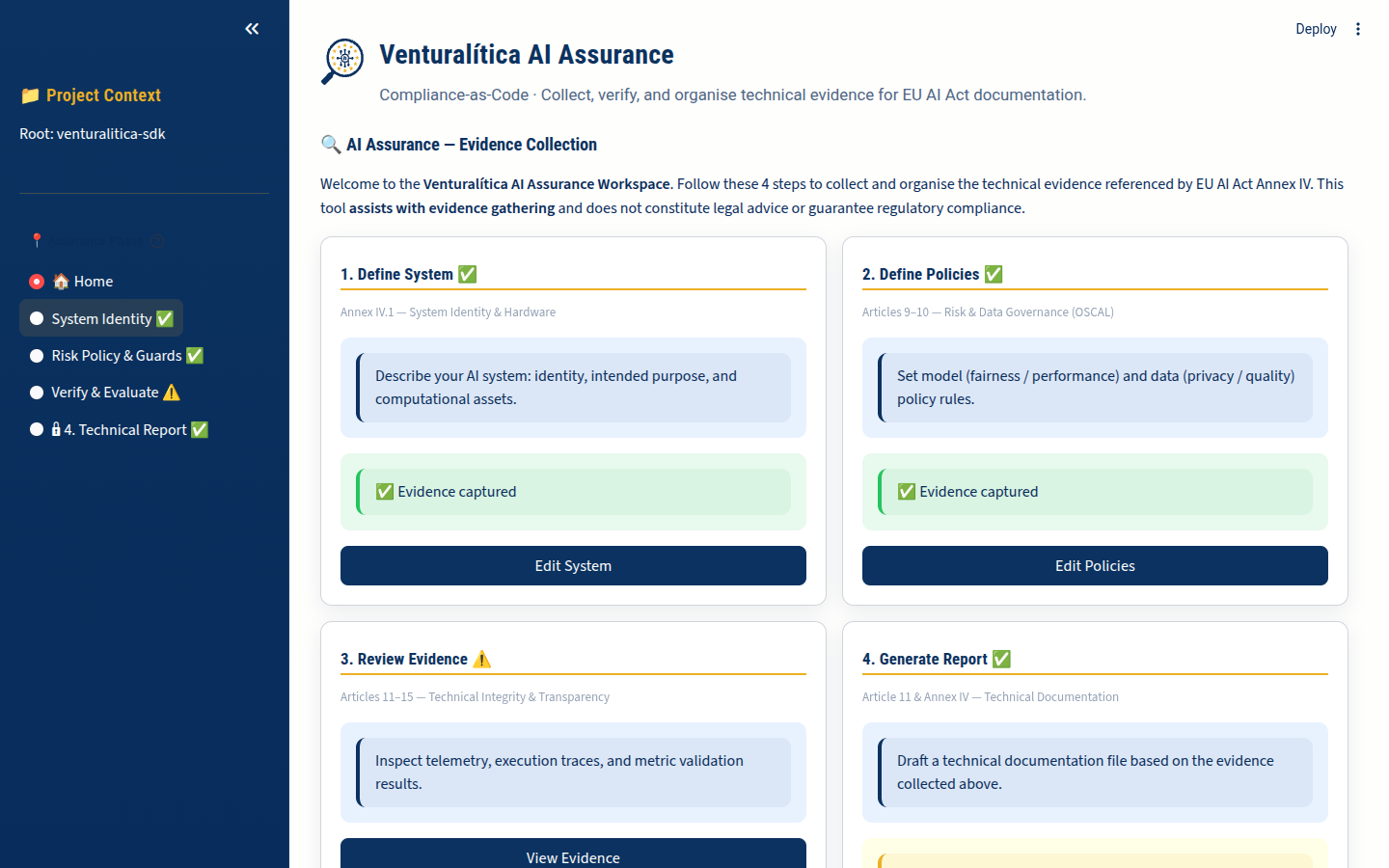
Home: AI Assurance — Evidence Collection
Section titled “Home: AI Assurance — Evidence Collection”The home screen presents 4 steps as a progress dashboard. Each step shows its evidence status:
| Step | Status Check | Description |
|---|---|---|
| 1. Define System | system_description.yaml exists | System identity and hardware description |
| 2. Define Policies | model_policy.oscal.yaml exists | OSCAL risk and data governance policies |
| 3. Review Evidence | results.json or trace_*.json exists | Telemetry, traces, and metric validation |
| 4. Generate Report | venturalitica_technical_doc.json exists | Generated Annex IV technical file |
Click any step card to navigate directly to that phase.
Phase 1: System Identity
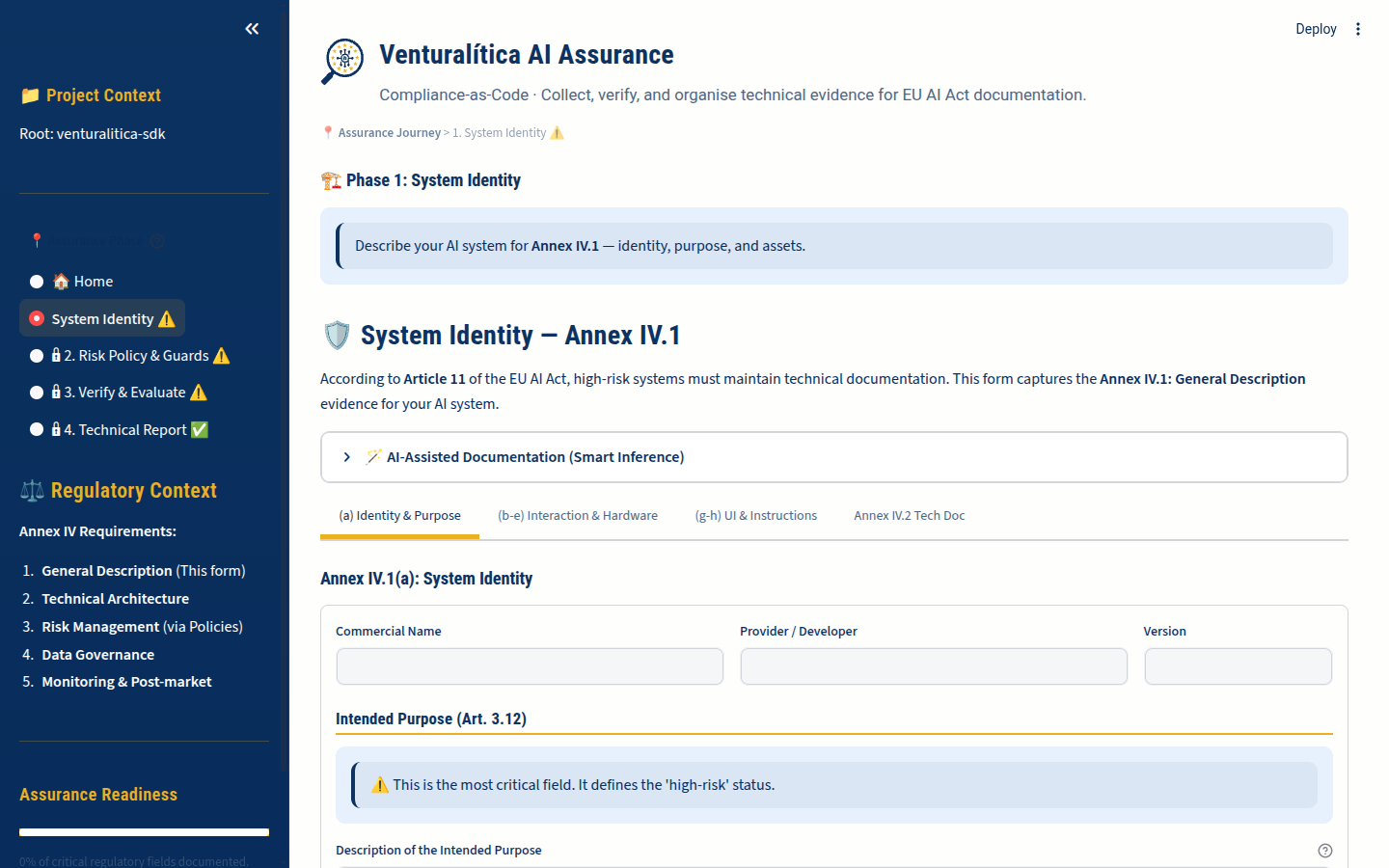
Section titled “Phase 1: System Identity”EU AI Act: Annex IV.1 (General Description of the AI System)
Define the “ground truth” of your AI system using the System Identity Editor. This creates system_description.yaml with:
- System name and version
- Intended purpose (e.g., “Credit scoring for loan applications”)
- Provider information
- Hardware description (compute resources used)
- Interaction description (how users interact with the system)
The editor provides a structured form. All fields map directly to Annex IV.1 requirements.
Phase 2: Risk Policy
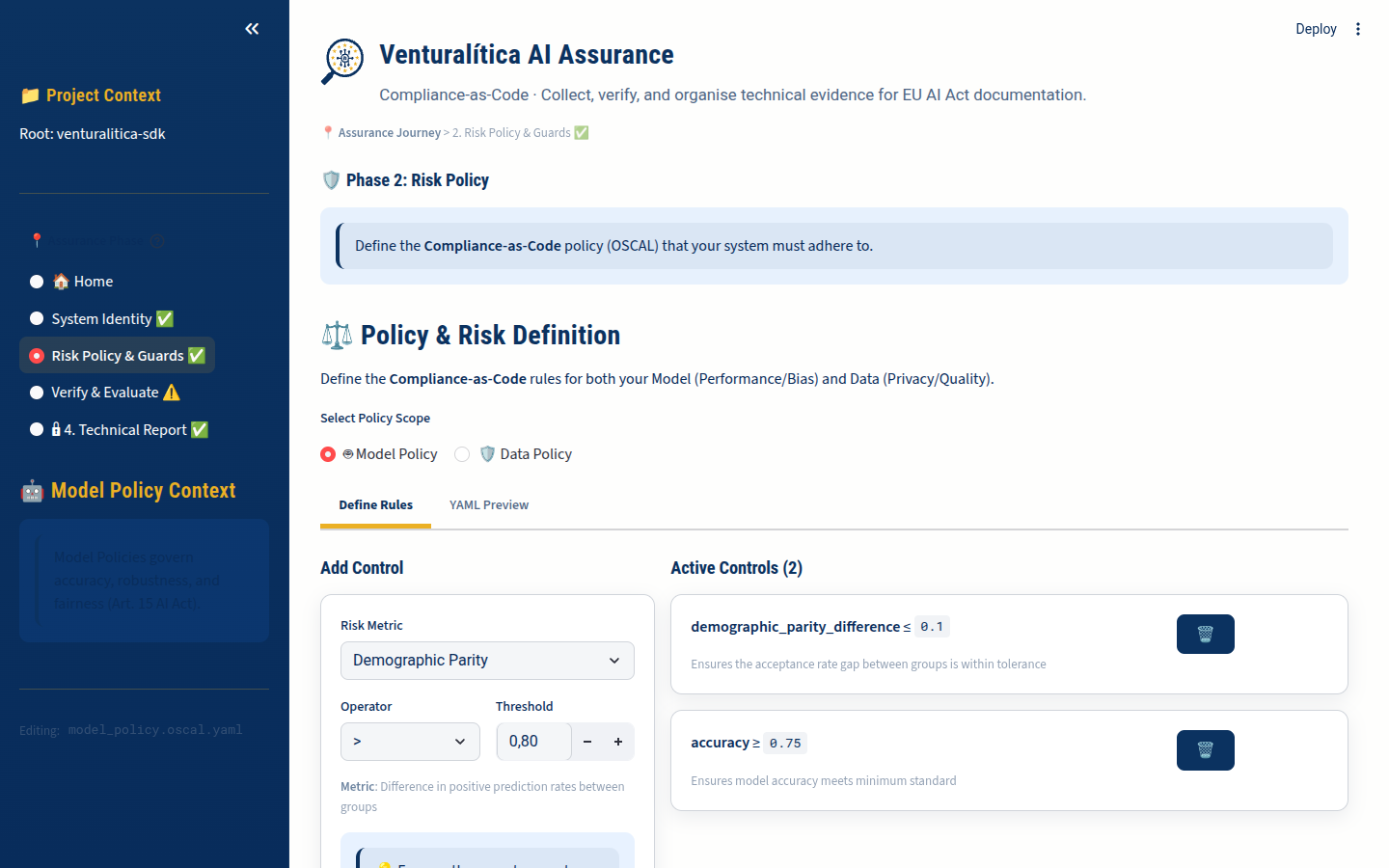
Section titled “Phase 2: Risk Policy”EU AI Act: Articles 9 (Risk Management) and 10 (Data Governance)
The Policy Editor lets you create and edit OSCAL policy files visually — this is the Compliance-as-Code step. It generates assessment-plan format OSCAL YAML with:
- Model Policy (
model_policy.oscal.yaml): Fairness and performance controls for model behavior - Data Policy (
data_policy.oscal.yaml): Data quality and privacy controls for training data
Policy Editor Features
Section titled “Policy Editor Features”- Add controls with metric selection from the full registry
- Set thresholds and comparison operators
- Map protected attributes (dimension binding)
- Preview the generated OSCAL YAML
- Save directly to your project directory
Phase 3: Verify & Evaluate
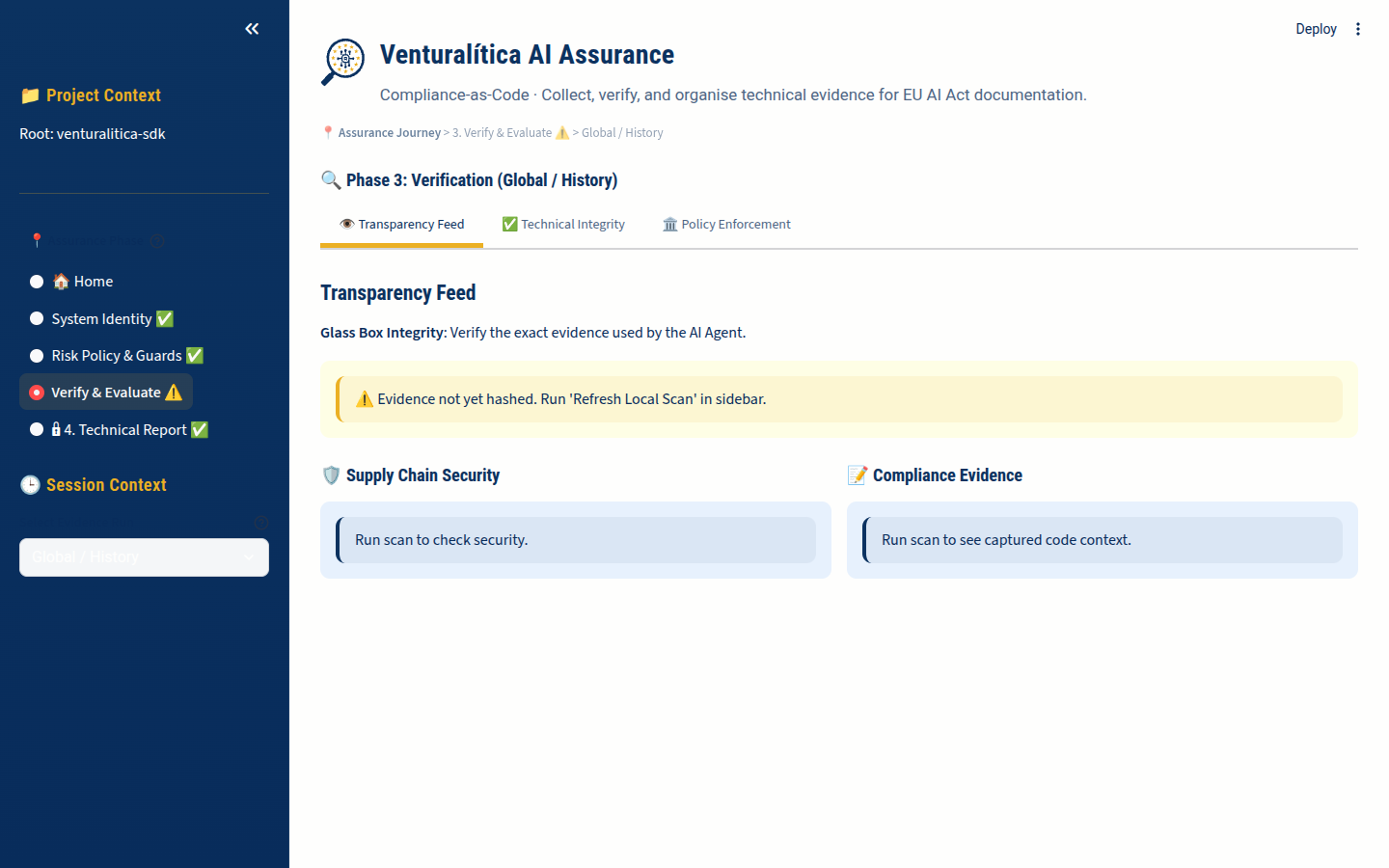
Section titled “Phase 3: Verify & Evaluate”EU AI Act: Articles 11-15 (Technical Documentation, Record-Keeping, Transparency, Human Oversight, Accuracy)
This phase requires evidence from running vl.enforce() and vl.monitor(). Select an evidence session from the sidebar to inspect.
Session Selector
Section titled “Session Selector”The sidebar shows all available evidence sessions:
- Global / History: Aggregated results from
.venturalitica/results.json - Named sessions: Individual
vl.monitor("session_name")runs with their own trace files
Tab: Transparency Feed
Section titled “Tab: Transparency Feed”Maps to Article 13 (Transparency). Shows:
- Software Bill of Materials (SBOM) — all Python dependencies with versions
- Code context — AST analysis of the script that generated evidence
- Runtime metadata — timestamps, duration, success/failure status
Tab: Technical Integrity
Section titled “Tab: Technical Integrity”Maps to Article 15 (Accuracy, Robustness, Cybersecurity). Shows:
- Environment fingerprint (SHA-256 hash)
- Integrity drift detection (did the environment change during execution?)
- Hardware telemetry (peak RAM, CPU count)
- Carbon emissions (if CodeCarbon is installed)
Tab: Policy Enforcement
Section titled “Tab: Policy Enforcement”Maps to Article 9 (Risk Management). Shows:
- Per-control assurance results with pass/fail status
- Actual metric values vs. policy thresholds
- Visual breakdown of which controls passed and which failed
- Assurance score summary
Phase 4: Technical Report
Section titled “Phase 4: Technical Report”EU AI Act: Article 11 and Annex IV (Technical Documentation)
The Annex IV Generator produces the comprehensive technical documentation required for High-Risk AI systems. It combines:
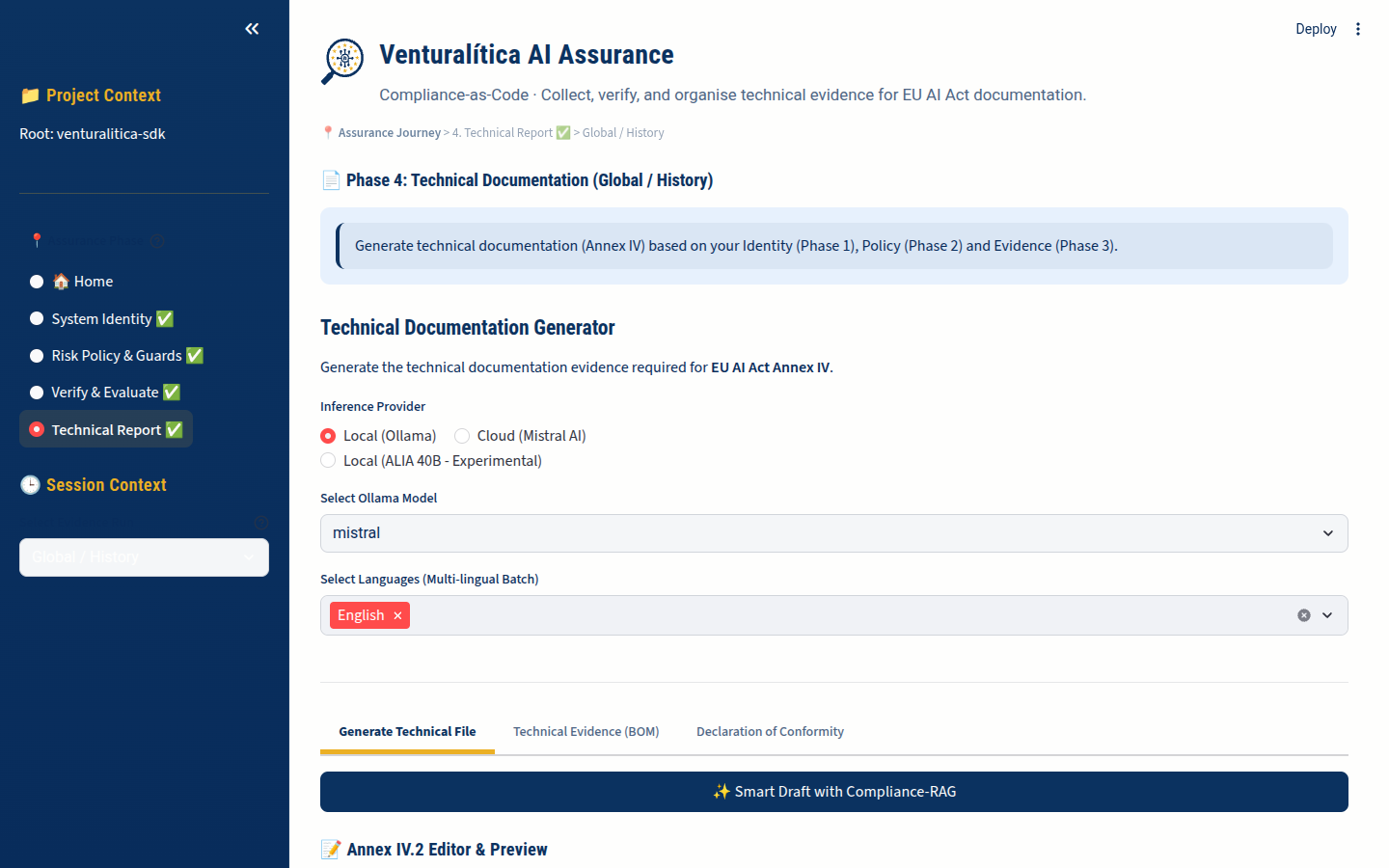
- Phase 1 data: System identity from
system_description.yaml - Phase 2 data: Risk policies from OSCAL files
- Phase 3 data: Evidence from enforcement results and traces
LLM Provider Selection
Section titled “LLM Provider Selection”| Provider | Privacy | Sovereignty | Speed | Use Case |
|---|---|---|---|---|
| Cloud (Mistral API) | Encrypted transport | EU-hosted | Fast | Final polish |
| Local (Ollama) | 100% offline | Generic | Slower | Iterative testing |
| Sovereign (ALIA) | Hardware locked | Spanish native | Slow | Research only |
Generation Process
Section titled “Generation Process”- Scanner: Reads trace files and evidence
- Planner: Determines which Annex IV sections apply
- Writer: Drafts each section citing specific metric values
- Critic: Reviews the draft against ISO 42001
Output
Section titled “Output”The generator produces:
venturalitica_technical_doc.json— structured dataAnnex_IV.md— human-readable markdown document
Convert to PDF:
# Simplepip install mdpdf && mdpdf Annex_IV.md
# Advancedpandoc Annex_IV.md -o Annex_IV.pdf --toc --pdf-engine=xelatex
Project Context
Section titled “Project Context”The dashboard operates on your current working directory. It reads:
| File | Purpose |
|---|---|
system_description.yaml | Phase 1 system identity |
model_policy.oscal.yaml | Phase 2 model policy |
data_policy.oscal.yaml | Phase 2 data policy |
.venturalitica/results.json | Phase 3 enforcement results |
.venturalitica/trace_*.json | Phase 3 execution traces |
.venturalitica/bom.json | Phase 3 software bill of materials |
venturalitica_technical_doc.json | Phase 4 generated documentation |
Run your vl.enforce() and vl.monitor() calls from the same directory where you launch venturalitica ui.
Keyboard Shortcuts
Section titled “Keyboard Shortcuts”The dashboard uses Streamlit. Standard Streamlit shortcuts apply:
R— Rerun the appC— Clear cache- Settings menu (top-right hamburger) for theme switching